

A WordPress website costs $180 to $600 in year one if you build it yourself, $1,500 to $6,000 if you hire a freelancer, and $8,000 to $35,000 through an agency. Ongoing costs run $200 to $900 a year for a small business site. The software is free. Everything around it isn’t.
That’s the short answer. The rest of this guide shows exactly where each of those numbers comes from, line by line, at 2026 prices.
Most cost guides answer this question with a range like “$100 to $100,000.” That’s technically true and completely useless. If you’re trying to decide whether to budget $500 or $5,000, a range spanning three orders of magnitude tells you nothing. This guide gives you the actual line items so you can add them up for your own project.
Table of Contents
- What a WordPress website costs in 2026: quick answer
- The year-two cost nobody warns you about
- Line-item costs: what you’re actually paying for
- A fully itemised build: 8-page service business site
- DIY, freelancer or agency: the short version
- WooCommerce and online stores
- What makes a cheap build expensive
- How to read a WordPress quote
- What changed in 2026
- So what should you budget?
- Frequently Asked Questions (FAQ)
What a WordPress website costs in 2026: quick answer
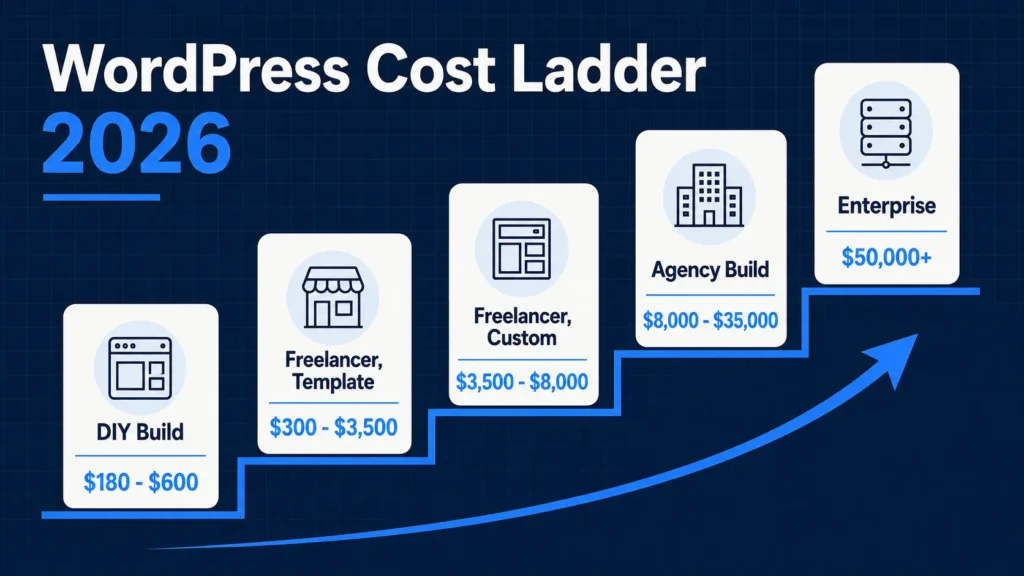
| Build path | Year one | Year two onward | Right for |
|---|---|---|---|
| DIY, free theme and plugins | $180 to $300 | $200 to $350 | Personal site, portfolio, testing an idea |
| DIY, premium builder | $350 to $600 | $400 to $700 | Small business willing to learn |
| Freelancer, template-based | $300 to $3,500 | $300 to $900 | Local service business, 5 to 12 pages |
| Freelancer or studio, custom | $3,500 to $8,000 | $600 to $1,800 | Established business, lead generation |
| Agency, custom design and build | $8,000 to $35,000 | $1,800 to $6,000 | Multi-location, complex content, integrations |
| WooCommerce store | $2,500 to $25,000 | $900 to $4,000 | Anyone selling online |
| Enterprise or multisite | $50,000+ | $10,000+ | Publishers, institutions, high traffic |
Two things to notice. First, year two isn’t the same as year one, and it’s the number most people forget to budget. Second, the gap between the DIY row and the agency row isn’t quality of software. It’s who does the work and how much of it they do.
The year-two cost nobody warns you about
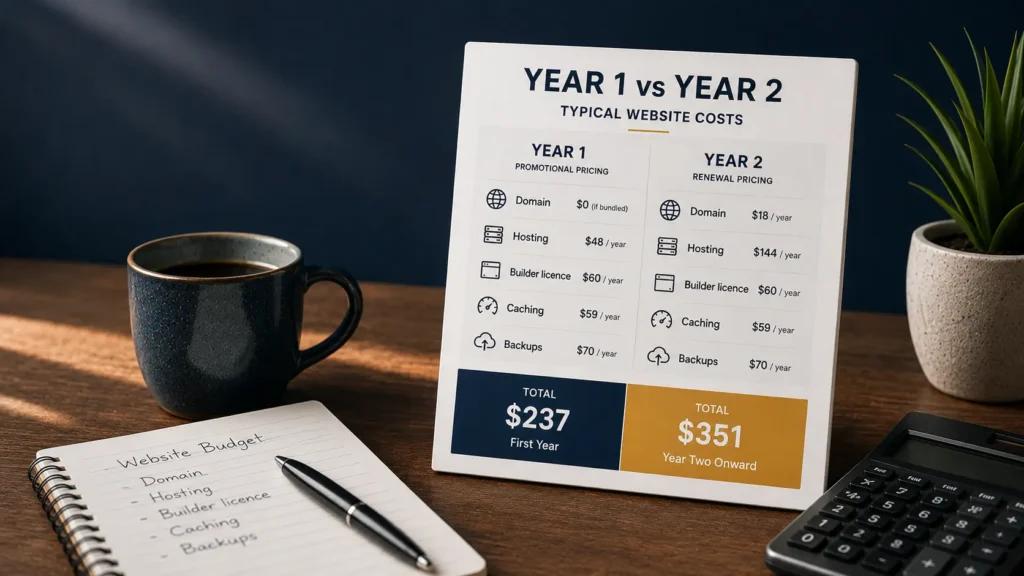
This is the single most common budget shock, and none of the major cost guides mention it.
Almost every budget host sells on promotional first-year pricing. You sign up at $3 a month, and the plan renews at $12 to $15 a month. Premium plugins work the same way: many advertise a first-year discount and renew at list price. Domains are the same story, with a cheap first year and a standard renewal after.
Run the arithmetic on a typical DIY small business build:
| Item | Year one | Year two |
|---|---|---|
| Domain | $0 (if bundled) | $18 |
| Shared hosting | $48 (promo) | $144 (renewal) |
| Premium builder license | $60 | $60 |
| Caching plugin | $59 | $59 |
| Backup plugin | $70 | $70 |
| Total | $237 | $351 |
One caveat on that first line. A free domain is common on annual hosting plans, but it isn’t universal, and it usually only covers popular extensions like .com or .net. If your host doesn’t include one, or you want a country domain like .de, .co.uk or .com.au, add $12 to $20 to both columns from day one. Check what your specific plan includes rather than assuming.
Year two is roughly 48% higher than year one, and nothing about the site changed. Budget on renewal pricing, not on the joining offer. If a quote or a comparison table only shows you year one, it’s showing you the flattering number.
Line-item costs: what you’re actually paying for
Domain name: $12 to $20 a year
A standard .com, .net or .org runs $12 to $20 annually. Many hosts include the first year free with an annual plan, which is a genuine saving as long as you know the renewal price.
Skip premium domains unless the name is central to the brand. Short, keyword-rich domains resell for hundreds to tens of thousands, and for a local business the marketing value almost never justifies it. A clear, memorable domain at $15 does the same job.
Country domains such as .de, .co.uk or .com.au often price differently and sometimes require a local presence. Check that before you fall in love with a name.
Hosting: $36 to $1,800 a year
Hosting is the biggest lever on both cost and performance, and the one people get wrong most often.
| Hosting type | Monthly | What you get | Right for |
|---|---|---|---|
| Shared | $3 to $15 | Server shared with hundreds of sites | Personal sites, low traffic, testing |
| Managed WordPress | $25 to $150 | Optimized stack, staging, backups, WP support | Business sites, anything earning money |
| Cloud or VPS | $30 to $200 | Dedicated resources, more control | Traffic spikes, custom requirements |
| Enterprise or dedicated | $200 to $1,000+ | Full server, SLA, dedicated support | High traffic, compliance requirements |
For a brochure site with modest traffic, shared hosting is genuinely fine. The upgrade earns its cost the moment the site starts generating revenue, because managed hosting bundles staging, automated backups, and support from people who understand WordPress rather than generic server support.
The trap is the middle: paying $15 a month for shared hosting that performs like $5 hosting. If you’re spending more than about $10 a month, compare against a real managed plan before renewing.
Theme or page builder: $0 to $200 a year
You have three genuine options here, and the cost difference is smaller than people assume.
Free theme plus core blocks: $0. Perfectly viable. Twenty Twenty-Five and the better free themes in the WordPress.org repository produce fast, clean sites. The limitation is design flexibility, not quality.
Premium theme: $40 to $100, usually one-time with a year of updates. Buys you a finished design and support. Check whether updates continue after year one or whether you’re re-buying annually.
Page builder or block toolkit: $60 to $100 a year. Elementor Pro starts at $60 a year for one site. Kadence’s entry tier is $99 a year. Both replace several separate plugins, so compare the license against the stack you would otherwise assemble, not against zero. If you’re weighing those two, I’ve compared them in detail in Elementor vs Kadence.
A builder license is the one recurring cost most likely to be forgotten. If it lapses, premium widgets stop working. Price it as a permanent line, not a purchase.
Plugins: $0 to $500 a year for a typical business site
You can run a competent small business site entirely on free plugins. Most people don’t, and the reasons are usually good ones.
| Function | Free option | Premium option | Premium cost |
|---|---|---|---|
| SEO | Rank Math, Yoast | Pro versions | $59 to $99/yr |
| Caching and performance | LiteSpeed Cache, W3 Total Cache | WP Rocket | around €49/yr (about $55) |
| Security | Wordfence free | Sucuri, Wordfence Premium | $99 to $299/yr |
| Backups | UpdraftPlus free | UpdraftPlus Premium | around $70/yr |
| Forms | WPForms Lite, Fluent Forms | Pro versions | $50 to $200/yr |
| Cookie consent | CookieYes free tier | Paid tiers | $0 to $120/yr |
A realistic premium stack for a small business site lands between $150 and $350 a year. You don’t need all six paid. The two worth paying for first are backups and caching, because those are the ones where the free version’s limitations cost you at the worst possible moment.
The real plugin cost isn’t licenses. It’s that every plugin adds update work, conflict risk and page weight. Twenty plugins on a five-page site is a maintenance bill disguised as a free stack.
Transactional email: $0 to $180 a year
This one is almost always missed in cost guides, and it breaks real sites.
WordPress sends email through PHP mail by default, and most hosts either block it or get it filtered to spam. Form notifications vanish. Password resets never arrive. WooCommerce order confirmations don’t land.
The fix is a proper sending service. Free tiers from the major providers cover a few hundred emails a month, which is enough for a brochure site. A store or a busy contact form needs a paid tier at $10 to $15 a month. Budget it before launch, not after the first missed inquiry.
Accessibility: $0 to several thousand
This became a real, budgeted line item rather than a nice-to-have.
In the EU, the European Accessibility Act‘s obligations took effect in June 2025 and reach many private-sector websites and e-commerce services, not just public bodies. In the US, WCAG 2.2 AA is the practical standard for public institutions and increasingly the benchmark in private litigation.
What it costs depends entirely on when you address it. Designing to WCAG 2.2 from the start adds perhaps 5 to 10% to a build. Retrofitting a finished site costs far more, because color contrast, focus states, heading structure and form labels are baked into the design system. Overlay widgets that promise instant compliance don’t deliver it and have themselves been the subject of legal action.
If you sell into the EU or your clients do, get this priced into the build.
Maintenance: $0 to $250 a month
WordPress core, PHP, plugins and themes all update. Something eventually breaks. The question is only who handles it.
| Approach | Cost | Reality |
|---|---|---|
| Do it yourself | $0 plus your time | Realistic if you’re technical and disciplined |
| Basic care plan | $30 to $80/month | Updates, backups, uptime monitoring, security scans |
| Full care plan | $100 to $250/month | The above plus content edits, priority fixes, performance |
| Fix it when broken | $0 until it’s $500 to $3,000 | The most expensive option, paid all at once |
The last row is what most small businesses actually choose, and it’s why so many sites end up needing a rebuild after three years. An unmaintained WordPress site doesn’t stay still; it degrades.
A fully itemised build: 8-page service business site
Here’s a complete first-year budget for a realistic small business site, using list prices rather than ranges.
| Line item | Cost | Note |
|---|---|---|
| Domain | $15 | First year often bundled free |
| Managed hosting | $300 | $25/month entry managed plan |
| Page builder license | $60 | One site |
| Caching plugin | $59 | Or free LiteSpeed Cache at $0 |
| Backup plugin | $70 | Off-site scheduled backups |
| SEO plugin | $0 | Free tier is genuinely sufficient |
| Forms plugin | $0 | Free tier covers 8 pages |
| Email sending | $0 | Free tier covers this volume |
| Stock photography | $0 to $150 | Free unless the brand needs specific imagery |
| Software subtotal | $504 to $654 | |
| Freelance build, 8 pages | $300 to $4,000 | Design, build, content entry, launch |
| Year one total | $800 to $4,650 | |
| Year two onward | $500 to $1,400 | Software renewals plus optional care plan |
That build line looks impossibly wide, and it deserves an explanation, because it’s the single biggest source of confusion when people compare quotes.
The same eight-page site genuinely does get built for $300 and for $4,000, by freelancers who are both competent. Two things drive the gap, and neither of them is quality.
Geography. A freelancer in Pakistan, India or the Philippines has a fraction of the living costs of one in London or Chicago. The hourly rate reflects rent and groceries, not skill. The WordPress that comes out the other end is identical.
Template-based versus custom. Adapting a proven premium theme to your brand is a fraction of the work of designing a bespoke system from scratch. For a brochure site, most businesses do not need the second one and are surprised to learn they were paying for it.
So the bottom of that range is real work at a real price, not a warning sign. What is a warning sign is a low price attached to a vague scope. Ask what’s included and the cheap-but-solid supplier will tell you precisely; the one to avoid will not.
Swap the freelance line for DIY and year one drops to roughly $500. Swap it for a US agency and it rises to $10,000 or more for the same page count, because you’re buying discovery, a design system, project management and post-launch support alongside the build.
DIY, freelancer or agency: the short version
The platform is identical in all three cases. What you’re buying is judgment and time.
Choose DIY if the site is a brochure, you have time, and no revenue depends on launching on a date. Budget $180 to $600.
Choose a freelancer if you need it done properly, want to talk to the person building it, and your requirements fit on one page. Budget $150 to $8,000 depending on where they’re based.
Choose an agency if the site is business-critical, needs integrations, has a content migration attached, or several stakeholders must sign off. Budget $8,000 to $35,000.
One thing worth knowing before you compare quotes: hourly rates vary far more by geography than by skill. The same eight-page build might cost $4,000 from a US freelancer, $1,800 from an Eastern European studio, and $400 from South Asia. Rate isn’t a proxy for quality in either direction. Portfolio, communication and post-launch availability are.
I’ve written up the full decision in freelance WordPress developer vs agency, including a scoring checklist, the real risks on both sides, and the situations where an agency genuinely earns its price.
WooCommerce and online stores
WooCommerce core is free. A store isn’t.
| Item | Cost | Note |
|---|---|---|
| WooCommerce plugin | $0 | Core is free and always has been |
| Payment processing | around 2.9% + $0.30 per transaction | Scales with revenue, never stops |
| Hosting | $25 to $350/month | Stores need more resources than brochure sites |
| Extensions | $50 to $250 each per year | Subscriptions, bookings, shipping rules |
| Product photography | $10 to $50 per product | Routinely underestimated |
| Build | $2,500 to $25,000 | Depends on catalog and integrations |
The cost that surprises people is transaction fees, because they scale forever. At $10,000 a month in sales, payment processing alone is roughly $3,500 a year, more than the entire software stack.
The second surprise is product data. Fifty products with variants, images, descriptions and categories is days of work regardless of who does it, and it’s almost never included in a build quote unless you ask.
What makes a cheap build expensive
The lowest quote wins on price by excluding work that still has to happen.
- Content writing and migration. Moving pages, images, metadata and downloads from an old site is often 10 to 25% of a project on its own.
- Redirect mapping. Redesigning without redirects loses rankings that took years to build. This is the most expensive omission on the list.
- Analytics and conversion tracking. A site that can’t tell you where leads come from can’t be improved.
- Performance work. A site that scores 40 on mobile won’t rank well and won’t convert.
- Training and documentation. If you can’t edit your own site, every text change becomes an invoice.
- Post-launch support. Ask how many revision rounds are included and what happens in week five.
- Licence renewals. Confirm who owns and pays for premium plugin licenses after launch.
A quote that’s 40% cheaper and excludes four of these isn’t cheaper. It’s deferred.
How to read a WordPress quote
Before comparing prices, compare scope. Ask every supplier the same questions:
- How many page templates are included, and how many pages?
- Who writes the content, and who enters it?
- Are redirects, metadata and analytics part of the scope?
- Which premium plugins are required, and who pays for renewals?
- Is accessibility addressed during design or after?
- What performance target are you building to, and how is it tested?
- How many revision rounds are included?
- What happens in the first 30 days after launch, and what does it cost?
- Who owns the hosting account, domain, licenses and code?
- If we part ways, what do we walk away with?
Question 9 matters more than it looks. A supplier who owns your domain and hosting owns your website, whatever the invoice says.
What changed in 2026
AI reduced build time, not build price. AI tools genuinely compress copywriting, wireframing and boilerplate code. The saving mostly shows up as faster delivery rather than lower quotes, because the expensive parts of a build were never typing. They were decisions, revisions and QA. Treat any quote that’s dramatically cheaper because of AI with the same skepticism as any other dramatically cheaper quote.
Hosting got more expensive on renewal. Introductory pricing stayed low while renewal rates climbed. The gap between the joining price and the real price is wider than it was two years ago.
Accessibility became a budget line. The EU’s obligations landed in June 2025 and changed accessibility from a nice-to-have into a scoped requirement for many private businesses.
Search sends fewer clicks. AI Overviews and answer engines resolve more queries without a visit. That doesn’t change what a site costs, but it changes what a site is for. Sites that exist purely to catch informational search traffic are worth less than they were. Sites that convert the visitors they do get are worth more. Budget accordingly: spend less on page count, more on the three pages that actually sell.
So what should you budget?
If you want one number to start from:
- Personal site or portfolio: $250 for year one, doing it yourself.
- Local service business: $3,000 for year one with a freelancer, $700 a year after.
- Established business with lead generation: $8,000 for year one, $1,500 a year after.
- Small online store: $6,000 for year one, plus roughly 3.5% of revenue in processing fees.
Then adjust for the three things that actually move the number: how much custom design you need, how much content has to be created or migrated, and how many systems the site has to talk to. Page count barely matters. Complexity does.
The most expensive WordPress site is the one you pay for twice.
Frequently Asked Questions (FAQ)
Is WordPress actually free?
The WordPress.org software is free and open source, with no license fee ever. A working website isn’t, because you still need a domain and hosting at minimum. The realistic floor for a live WordPress site is around $180 in the first year.
How much does a WordPress website cost per month?
A DIY site runs $15 to $50 a month all in. A small business site with managed hosting and a care plan runs $60 to $150 a month. A store or a site with a full agency retainer runs $200 to $600 a month. Those figures include hosting, licenses and maintenance, but not the one-time build.
Can I build a WordPress website myself?
Yes, and for a brochure site it’s a reasonable choice. Budget 20 to 40 hours for your first build if you’re starting from zero. The honest test is whether your time is worth less than the $2,000 or so you would save. For most business owners it’s not, but for a side project or a first venture it usually is.
Why do quotes for the same website vary so much?
Because they aren’t for the same website. One quote covers installing a theme and adding your text. Another covers discovery, a custom design system, content migration, redirect mapping, accessibility, performance testing and 30 days of support. Compare the scope line by line before comparing the totals.
How much does WordPress maintenance cost?
Doing it yourself costs only your time, roughly two hours a month. A basic care plan covering updates, backups and monitoring runs $30 to $80 a month. A full plan that includes content edits and priority fixes runs $100 to $250 a month. Skipping maintenance entirely tends to cost $500 to $3,000 in one lump when something eventually breaks.
How much does a WooCommerce store cost?
The plugin is free. A working store is $2,500 to $25,000 to build depending on catalog size and integrations, plus $900 to $4,000 a year to run. On top of that, payment processing takes roughly 2.9% plus $0.30 per transaction, which never stops and scales with your revenue.
Should I use WordPress.com or WordPress.org?
WordPress.org is the self-hosted open-source software, and it’s what this guide prices. You control hosting, plugins and code. WordPress.com is a hosted service with plans that bundle those decisions for you. WordPress.com is simpler to start; WordPress.org is cheaper at scale and doesn’t limit which plugins you can install.
Is WordPress cheaper than Wix or Squarespace?
Not in year one, usually. Hosted builders bundle hosting, security and support into one subscription of roughly $16 to $50 a month, which is competitive with a DIY WordPress stack and simpler to set up. WordPress becomes cheaper over three to five years, and it’s the only one of the three where you can move your site elsewhere without rebuilding it.
What is the cheapest way to get a professional-looking site?
Buy a well-built premium theme or starter template for around $60, pair it with decent managed hosting, and spend your remaining budget on photography and copy rather than on custom design. Design is what most people overspend on and content is what most people underspend on, and visitors notice the second one more.
Does a more expensive website rank better on Google?
Not directly. Price isn’t a ranking factor. What correlates is the work that tends to come with a bigger budget: clean technical structure, fast loading, sensible information architecture, and proper redirects during a migration. You can get all of those on a modest budget if you know to ask for them, which is exactly why the questions in this guide matter more than the number at the bottom of the quote.