

Most Elementor vs Kadence comparisons were written before May 2026. That matters, because the thing that changed this year is not a feature. It is who owns Kadence and how you buy it.
I build and maintain WordPress sites every day, most of them on Elementor, some on Kadence where loading speed was the deciding factor. This is not a “switch to the lightweight one” article. It is what I would tell a client who asked me which one to start their next site on, including the parts that are inconvenient for both tools.
Table of Contents
- Quick verdict
- The 2026 change nobody should skip
- The core difference
- Editor experience
- Performance
- Design freedom vs structure
- Header, footer and theme building
- Pricing
- Lock-in and the cost of leaving
- WooCommerce
- SEO
- Who should choose which
- Still Have Questions About Kadence vs Elementor?
- The verdict
Quick verdict
| Kadence | Elementor | |
|---|---|---|
| Core approach | Lightweight theme plus Gutenberg block toolkit | Visual page builder plugin |
| Editing style | Blocks in the native WordPress editor | Front-end drag-and-drop canvas |
| Baseline performance | Lighter output, less tuning needed | Heavier output, more tuning needed |
| Design freedom | Strong but structured | Higher, with less friction |
| Header and footer builder | In the free theme | Needs Elementor Pro |
| Entry price (paid) | $99/yr | $60/yr |
| Multi-site license | $499/yr top tier, capped | $540/yr unlimited (One Agency) |
| Exit cost if you leave | Moderate | High |
| Ownership stability | Changed hands and portals in May 2026 | Independent, stable |
| Best fit | Content sites, WooCommerce, speed-sensitive builds | Marketing pages, custom layouts, client work at volume |
Short answer: Kadence for content-led sites where speed is the product. Elementor when the page design is the product and you need to ship varied layouts fast. Neither choice is reversible cheaply, which is the part most comparisons skip.
The 2026 change nobody should skip
On May 12, 2026, Liquid Web retired the StellarWP brand and folded Kadence directly into its own software platform. kadencewp.com now redirects to a product page on liquidweb.com. Accounts, support and downloads moved to a single portal at software.liquidweb.com.
The migration was rough. Users reported login failures, missing order history, and lifetime licenses that did not appear in the new dashboard. Four sibling products in the same portfolio (SolidWP, IconicWP, Restrict Content Pro and MemberDash) were discontinued outright, with security patches scheduled to end in April 2027.
Kadence itself was not discontinued. It is one of four products Liquid Web kept, alongside LearnDash, The Events Calendar and Give. The theme and blocks still work, still perform well, and the plans arguably bundle more than they used to.
But it changes how you should read the “future-proof” argument. Kadence’s pitch has always been that building on Gutenberg keeps you close to WordPress core and reduces dependency risk. That is still true about the code. It is no longer true about the company. The lifetime license is gone with no replacement, unlimited-site licensing is gone, and the roadmap now sits inside a private-equity-owned hosting business.
Elementor, for its part, remains independently operated. If you are choosing a tool to standardize a client roster on for the next five years, that asymmetry belongs in the decision.
The core difference
Kadence extends the WordPress block editor rather than replacing it. You get the Kadence Theme, the Customizer, global color and typography controls, and Kadence Blocks for layout. It feels like a better-equipped version of stock WordPress.
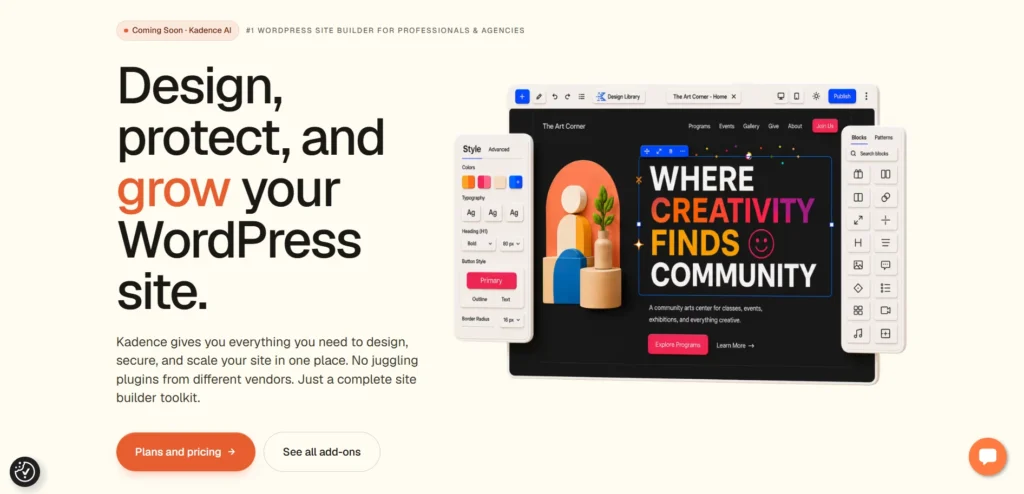
Elementor is a separate editing environment that sits on top of WordPress. You work in a front-end canvas, drag widgets in, and style them in a sidebar with live preview. It is faster to design in, and it adds its own CSS, JavaScript and rendering layer to every page that uses it.

Everything below follows from that one architectural difference.
Editor experience
Kadence. You build in Gutenberg. Kadence Blocks adds rows, columns, tabs, accordions, forms, buttons and advanced spacing controls to the native editor. Site-wide styling lives in the Customizer and global settings. The learning curve is gentler if you already know WordPress, and the editor stays fast on long pages.
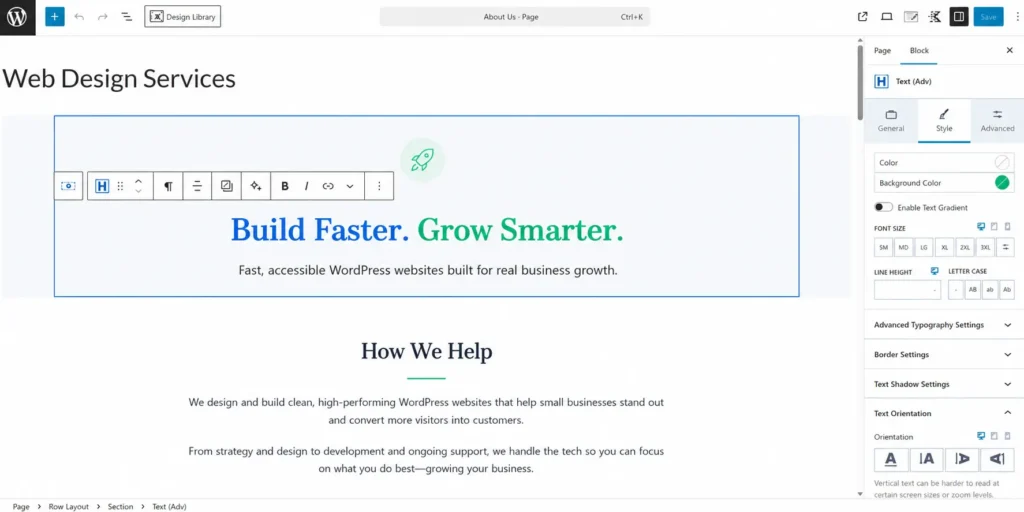
The trade-off is that Gutenberg still shows you an approximation, not the finished page. You will open a preview tab more often than you would in Elementor.
Elementor. You see the real page while you edit it. Spacing, alignment, responsive breakpoints and motion are all direct manipulation. For anyone who thinks visually rather than structurally, this is a genuine productivity difference, not a preference.
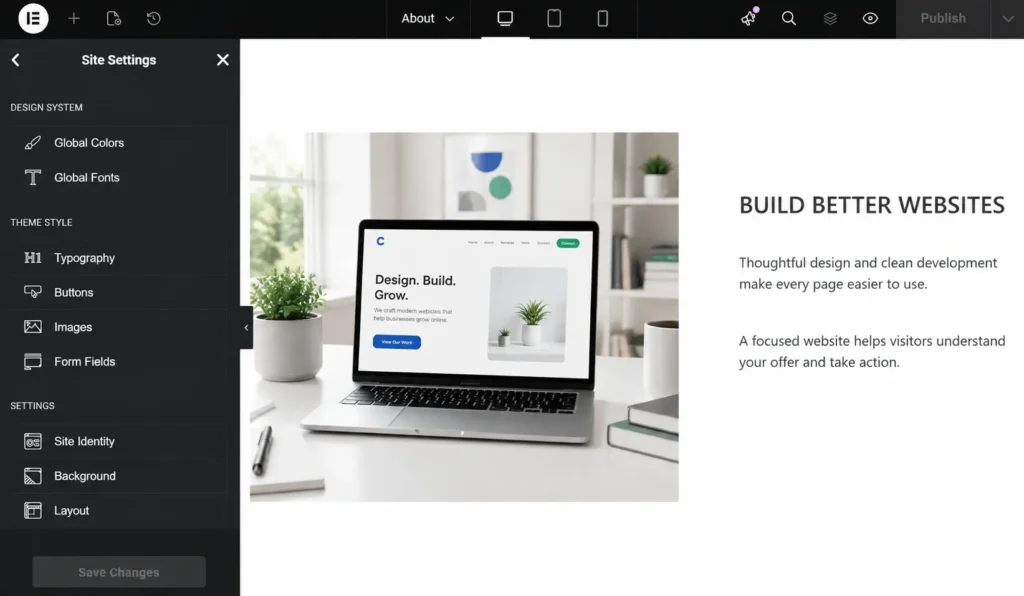
The trade-off is weight, in the editor and on the front end. Elementor’s editor slows down noticeably on pages with deeply nested containers, and that is often the first sign a page is over-built.
Performance
Kadence produces lighter pages. That is not in dispute and it follows directly from the architecture: fewer wrapper elements, less CSS per page, less JavaScript for interactions.
The number that gets quoted everywhere deserves context. It comes from a single test by DIY Dream Site in autumn 2021, where the same homepage design was built twice on staging and the Elementor version scored 30 points lower in PageSpeed Insights. It is a fair, honestly reported result, but it is one page, one design, five years ago, and both tools have shipped performance work since. Treat it as a direction, not a measurement.
Independent builder-by-builder testing puts unoptimized out-of-the-box mobile scores in roughly the same order: Kadence around 72, Elementor Pro around 68, Elementor around 61, with Astra, Avada, Oxygen and Divi below. The gaps are real but smaller than the folklore suggests, and every one of those builders can be optimized into the 90s with caching, image compression and script control.
What actually makes an Elementor site slow, in my experience, is rarely Elementor itself:
- Nested containers three and four levels deep where one would do
- Icon and font libraries loading sitewide for two icons on one page
- Motion effects and animations above the fold
- Third-party widget add-on packs loading their full asset bundle everywhere
- Sliders used where a static image would have worked
I have written up the full diagnosis and the fixes in why Elementor sites load slowly, and the metric-by-metric side of it in how to improve Core Web Vitals in WordPress.
Fix those five things and the builder gap narrows to something most visitors will never perceive. What you cannot fix is that you have to keep fixing them. Kadence starts closer to the finish line and stays there with less discipline.
Design freedom vs structure
This is the trade-off that decides most projects, and it is not really about capability. Both tools can build the same page. The difference is what happens by default and how hard it is to go off-script.
Elementor rewards going off-script. Overlapping elements, asymmetric grids, negative margins, custom breakpoints, scroll-triggered motion, all reachable without writing CSS. If a client sends a Figma file with an unconventional hero, you can match it. That is why agencies keep paying for it.
Kadence rewards staying on-script. Global colors, global typography, consistent spacing scales and a structured block set mean pages look like they belong to the same site without anyone enforcing it. On a fifteen-page business site built by two people, that is worth more than the ability to overlap a card on a heading.
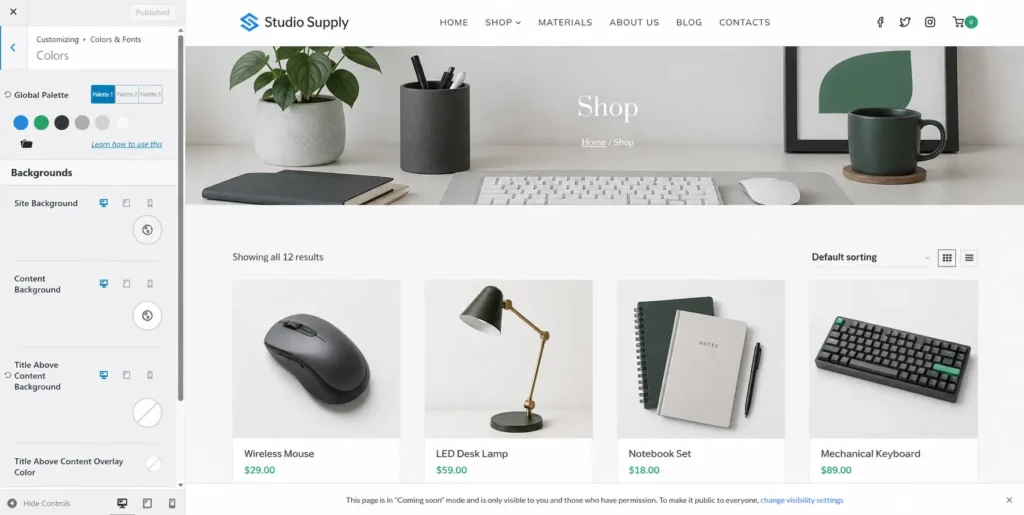
The honest framing is this: Elementor’s freedom is also its main failure mode. Given unlimited control, most people, including experienced designers under deadline, build heavier pages than they need to. Kadence’s constraints are load-bearing. They are the reason Kadence sites tend to stay fast six months after launch, more than any code-level advantage.
If you are the only person who will ever touch the site, take the freedom. If the site will be edited by a client, a junior, or you in a year, take the guardrails.
Header, footer and theme building
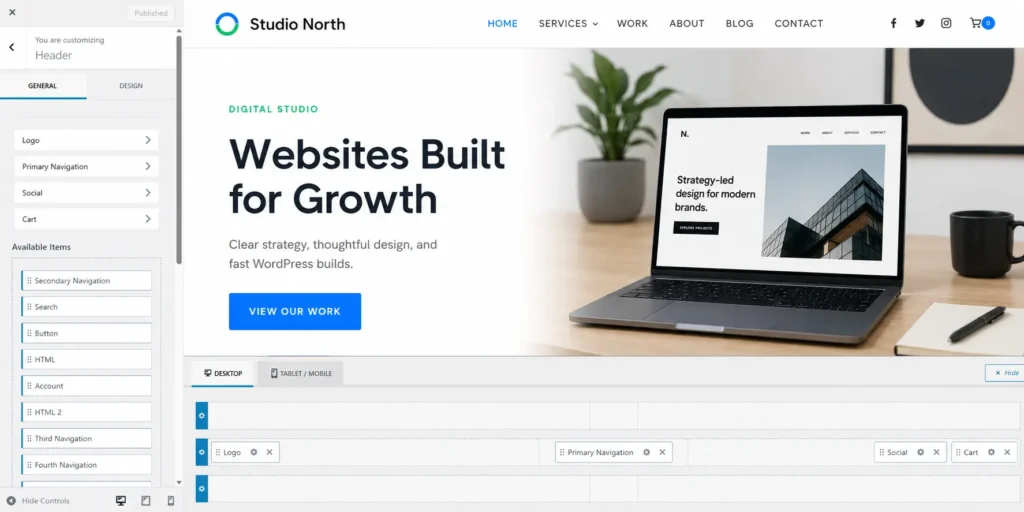
Kadence includes a drag-and-drop header and footer builder in the free theme, with top, main and bottom rows, plus a separate mobile header builder. For a lot of small business sites that alone covers the site-wide layout requirement with no purchase.
Elementor’s Theme Builder (headers, footers, archive templates, single post templates, 404s) is Elementor Pro only. Free Elementor builds page content and nothing else. If you want full visual control over templates, you are buying Pro from day one.
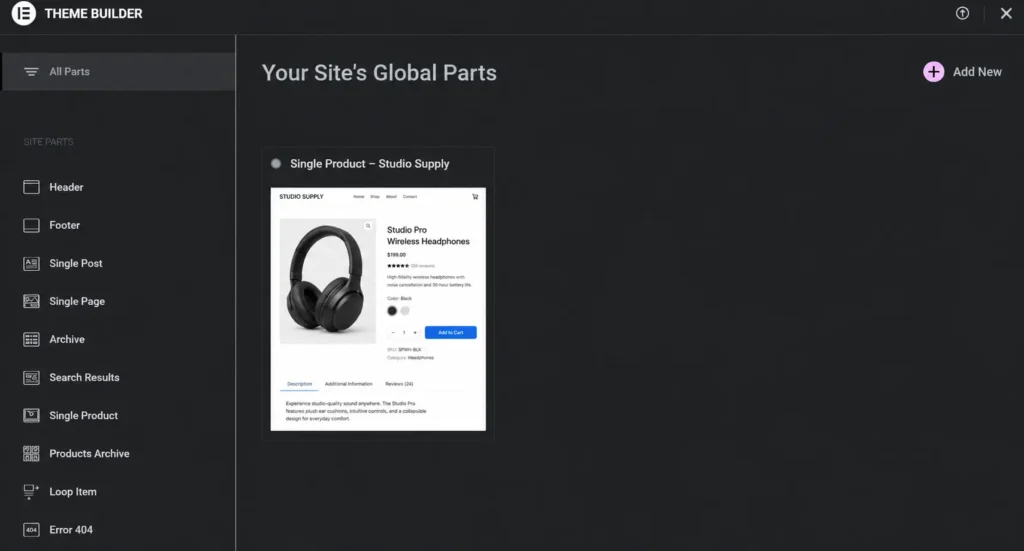
Elementor Pro’s theme builder is more capable once you have it. Kadence’s is free and covers the 80% case. Which matters depends entirely on whether that last 20% is in your brief.
Pricing
Both restructured in 2026, so ignore any figure you read in an older article, including the widely-copied “$219/year, $699 lifetime” for Kadence, which refers to plans that no longer exist.
Kadence pricing
Three annual tiers under Liquid Web:
| Tier | Price | Adds |
|---|---|---|
| Essentials | $99/yr | Theme Pro, Blocks Pro, full template library |
| Pro | $299/yr | Shop Kit for WooCommerce, security, backups, memberships |
| Elite | $499/yr | Kadence Central multi-site management, white label, A/B testing |
The lifetime license was discontinued for new buyers, and existing lifetime customers are grandfathered. Site limits per tier were tightened and reported inconsistently during the transition, so confirm the current allowance at checkout before buying, especially if you manage client sites.
Elementor pricing
Elementor now splits its pricing into two families: the classic Editor Pro plans, and the newer Elementor One bundles that add AI credits and site management on top.
| Plan | Price | Sites | AI credits |
|---|---|---|---|
| Essential | $60/yr | 1 | None |
| Advanced Solo | $84/yr | 1 | None |
| One | $180 first year, then $228/yr | 1 | 25,000/month |
| One Agency | $432 first year, then $540/yr | Unlimited | 350,000/month |
The One plans are promotional in year one. Those headline prices carry a 21% and 20% discount. What renews is $228/yr and $540/yr. Budget on the renewal figure, not the joining figure.
Prices checked August 2026 on elementor.com. The pricing page shows only Essential and Advanced Solo on first load; Advanced and Expert appear when you switch the 1 / 3 / 25 toggle on the Advanced Solo card. Elementor discontinued lifetime licenses in 2022, so every plan renews annually.
Reading the two together
For a single site, Elementor is cheaper: $60 against $99.
For volume, Elementor is now clearly cheaper. One Agency covers unlimited sites at $540/yr on renewal. Kadence’s top tier is $499/yr with a site cap. If you run more than about twenty-five client sites, that is not a close comparison. This is a change from 2025, when Kadence’s higher tiers looked more generous.
Against that, Kadence Pro at $299 bundles security, backups and a WooCommerce toolkit you would otherwise buy separately. Compare your whole plugin stack, not just the builder line item.
Both tools are genuinely usable free. Free Kadence gives you the theme, blocks and the header and footer builder. Free Elementor gives you page building only.
Lock-in and the cost of leaving
This is the section most comparisons skip, and it is the one that costs real money.
Elementor. Page content is stored as builder data in post meta, not as portable post content. Deactivate the plugin and your pages render as unstyled fragments or shortcode residue. There is no export path to clean HTML or to blocks. Migrating an Elementor site off Elementor is a rebuild, page by page. Budget accordingly before you standardize a client roster on it.
Kadence. Better, but not free. Layouts built with Kadence Blocks are stored as Gutenberg block markup, so content survives in readable form, but deactivate the plugin and Kadence blocks render as invalid-block warnings until you convert them. Core blocks survive cleanly, Kadence-specific ones do not. The theme’s global styling and header and footer configuration do not transfer to another theme at all.
So the “Kadence has no lock-in because it is just Gutenberg” claim is half true. You are less locked in than with Elementor. You are not unlocked.
If your license lapses. Neither platform immediately disables the existing site. Elementor says deactivating or not renewing Elementor Pro does not affect the live site, but you lose Pro updates, support, the ability to add new Pro features, and may have limited access to editing existing Pro features. Updating Elementor Free while leaving Pro outdated can also create compatibility problems. Kadence similarly allows installed products to continue working after cancellation, but updates, premium support, templates, designs and new license activations are no longer available. In both cases the website can remain online, but maintaining an active license is the safer option for compatibility, security and continued editing. Treat both as recurring maintenance costs rather than one-time purchases.
WooCommerce
Kadence is the safer default for stores, mainly because store pages are template-heavy and template weight compounds. Shop Kit (Pro tier) adds variation swatches, product galleries, upsells and checkout tooling built for conversion rather than for visual customization.
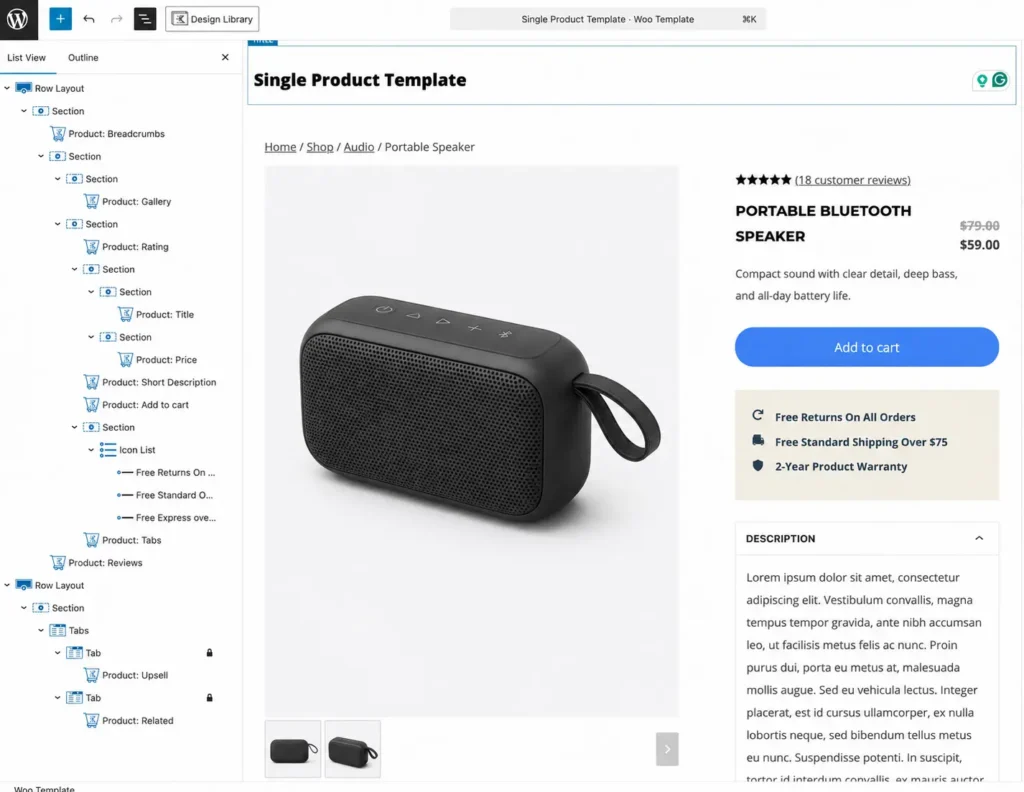
Elementor Pro can visually build product and archive templates, which is valuable for a strongly branded storefront. On a catalog of any size, it demands stricter caching, image delivery and script control to stay quick, and store pages are the pages where speed shows up in revenue.

If your store is twenty products and the brand is the differentiator, Elementor is defensible. The AussieChamp storefront is a good example of that trade being worth taking: an illustration-led WooCommerce brand where personality was the point. If it is 500 products and search traffic is the channel, use Kadence.
SEO
Neither tool ranks you. Both output crawlable HTML and both work with Rank Math or Yoast without special handling.
The real difference is that Core Web Vitals are a ranking input, and Kadence needs less work to pass them. That is an advantage of degree, not of kind. A well-optimized Elementor site outranks a neglected Kadence site every time.
Where builders genuinely hurt SEO is heading structure. Both tools make it trivially easy to pick an H2 because it looks the right size, and end up with three H1s and no logical outline. That is a discipline problem in either tool, and it is one of the items on the WordPress technical SEO checklist.
Worth noting for 2026: with AI Overviews and answer engines taking a growing share of clicks, clean semantic structure now does double duty. It is not just for crawlers any more. I have broken that down in SEO vs AEO vs GEO.
Who should choose which
Choose Kadence if:
- The site is content-led: blog, publisher, service business, documentation
- You or your client will edit it regularly and consistency matters more than novelty
- It is a WooCommerce store where speed drives revenue
- You are comfortable in Gutenberg and want to stay near WordPress core
- Your plugin budget can absorb security, backups and commerce in one bundle
Choose Elementor if:
- Page design is the deliverable: landing pages, campaigns, brand sites
- You manage many client sites and per-site license cost is a real constraint
- You need popups, motion effects and advanced templates without custom code
- Your team already knows it and retraining would cost more than the performance gap
- You are building to a design file you did not author and cannot renegotiate
Using both is possible: Kadence as the theme, Elementor for selected pages. It is what a lot of real sites end up as. Be clear-eyed that it loads both systems on the pages that use Elementor, so you keep Kadence’s global styling but lose most of its performance advantage there.
Still Have Questions About Kadence vs Elementor?
Is Kadence faster than Elementor?
Out of the box, yes, by a meaningful margin. After serious optimization, the gap narrows to something most visitors will not notice. The durable advantage is that Kadence needs less ongoing discipline to stay fast.
Can I switch from Elementor to Kadence without rebuilding?
No. Elementor stores page content in its own format, so there is no clean conversion path. Plan a page-by-page rebuild and budget for it before you commit either way.
Do Elementor pages break if I stop paying for Pro?
Not immediately. Elementor states that not renewing Pro does not take the live site down. What you lose is updates, support, the ability to add new Pro features, and in some cases full editing access to existing ones. The real risk is drift: updating Elementor Free while Pro stays frozen creates compatibility problems over time. Kadence behaves the same way. Treat both as recurring maintenance costs.
Does Elementor work with the Kadence Theme?
Yes, and it is a common setup. You keep Kadence’s global controls and header and footer builder, and accept Elementor’s asset load on the pages that use it.
Is Kadence still safe to build on after the Liquid Web move?
The product is one of four Liquid Web kept and is actively developed. The theme and blocks are free on WordPress.org, which limits your downside. What changed is licensing and ownership, not code quality. If long-term vendor independence is a hard requirement, factor it in.
Do I need Elementor Pro for headers and footers?
Yes. Free Elementor builds page content only, and the Theme Builder is a Pro feature. Kadence’s free theme includes a header and footer builder with no purchase.
How much does Elementor Pro cost in 2026?
Essential is $60 a year for one site and Advanced Solo is $84 for one site. The multi-site tiers only appear once you switch the site-count toggle on the pricing page, so check those directly. The Elementor One bundles add AI credits: One is $180 in the first year and renews at $228, and One Agency covers unlimited sites at $432 in the first year and $540 on renewal.
Is Kadence better for beginners?
It depends which kind. Kadence is easier for someone learning WordPress properly, because it uses the native editor. Elementor is easier for someone who thinks visually and wants results in an afternoon.
What about Bricks, Beaver Builder and Divi?
Bricks is the serious performance-focused alternative in 2026 and worth evaluating if clean output matters more than ecosystem size. Beaver Builder remains stable and agency-friendly. Divi is a visual-first tool with the same weight trade-offs as Elementor. The strategic split is still Gutenberg-native versus builder-on-top.
The verdict
Start new content-led sites on Kadence. Start design-led and client-volume work on Elementor. Neither is a mistake and neither is reversible cheaply, so make the decision on what the site will need in year three, not what feels quicker in week one.
And do not let anyone, including this article, tell you the builder is why your site is slow. It is almost always the last five things someone added to the homepage.